Security architecture
Exportelier's security model rests on a deliberate split into two apps, so that the app handling your issue data has no way to send it anywhere.
Main app: no fetch, no webtriggers
The main app declares no external fetch and no webtriggers in its Forge manifest. PDFs render entirely on Forge, with no headless browser and no third-party servers. This is enforced by Atlassian's platform — it is an architecture guarantee, not a policy promise.
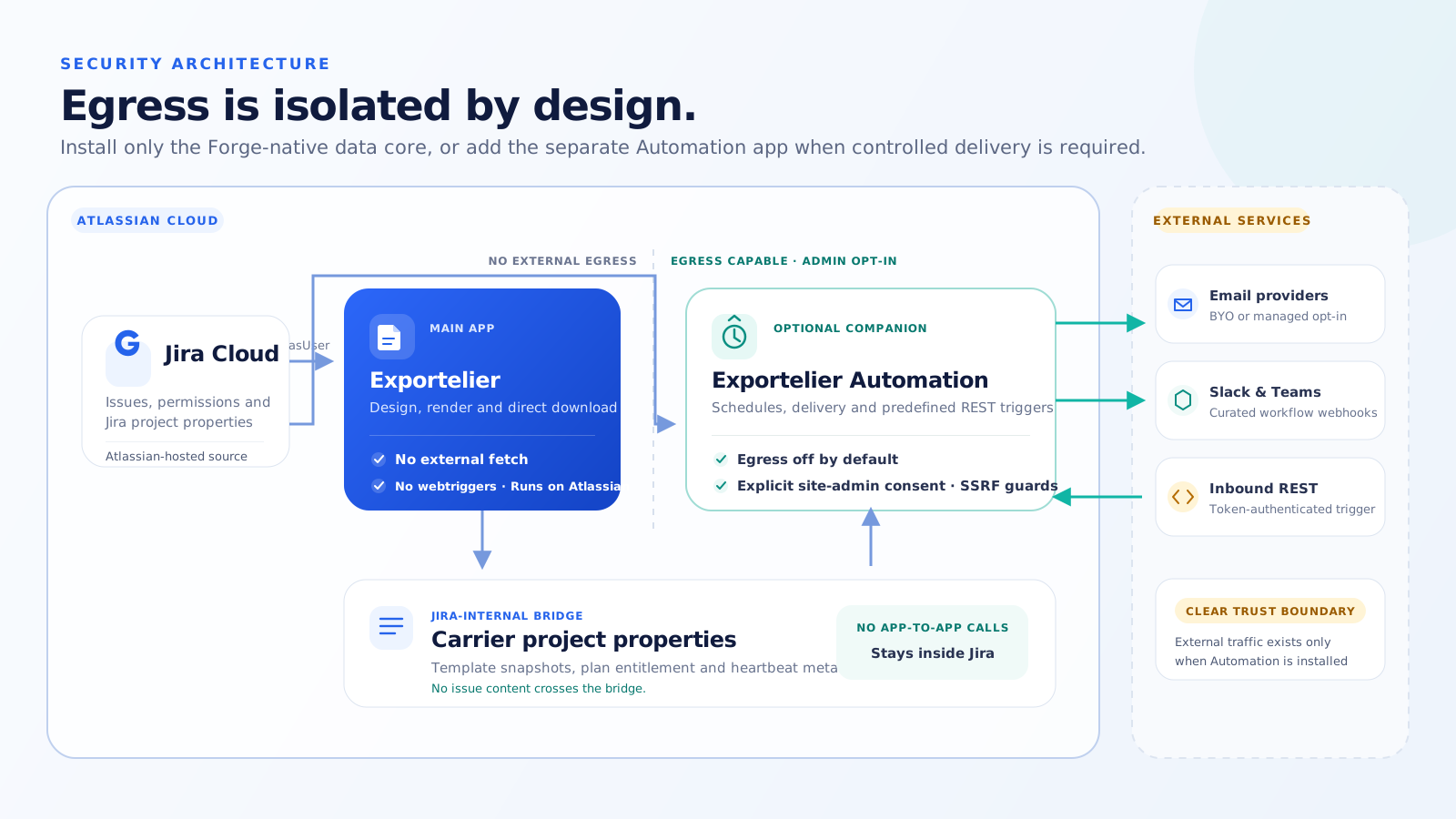 A diagram: the main app (no egress, renders on Forge) alongside the Automation app (all egress, isolated).
Automation app: isolated egress
Everything that needs to send data outward — email, Slack incoming webhooks, Microsoft Teams Workflows and API — lives in the separate Exportelier Automation app. It carries all outbound traffic, with SSRF protection and provider-specific secret URLs.
Reports read Jira as the exporting user
Every Jira read a report performs — listing Saved
Filters, checking them in preflight, and searching them during the export — runs
as the person who started it, using Forge's asUser identity. The app never
falls back to its own app identity to make a queued export succeed.
Two properties follow directly:
- Site-admin status in Exportelier never widens Jira visibility. An admin can build a report from filters they can see; that grants no one else access to them. If a source is not available to the exporting user, the export fails and names it rather than quietly omitting a data source.
- No query is ever stored or assembled from your text. Exportelier keeps a
Saved Filter's numeric id and builds exactly one strictly numeric predicate,
filter = <id>. Filter JQL is never read, stored, logged or concatenated, so there is no JQL-injection surface and no stale copy of your query.
Report output is temporary and deleted after download — see Data retention & GDPR.
Dashboard import uses documented APIs only
Dashboard import reads Jira exclusively through Atlassian's documented Jira Cloud dashboard REST API, as the importing user. It does not parse Jira web pages, read gadget iframes, capture screenshots, use undocumented gadget-preference endpoints, or send anything outside Forge. It required no new permission scope.
What is read is deliberately narrow. Gadget configuration values are validated against a per-gadget allowlist, size-capped well below Jira's own maximum, and never logged, echoed into errors or written to audit events. Filter JQL is never stored, even when a gadget property happens to contain it — an imported report keeps the same numeric filter id every other report keeps.
One of the operations involved, Get gadgets, is marked Experimental by Atlassian. If its response stops matching what Exportelier verified against a real Jira site, the import path fails closed and the feature disables itself rather than acting on a misread response. Existing reports and exports are unaffected.
Audit events record that an import record was checked or deleted. They carry no gadget configuration, no JQL and no issue data.
Why split them
If your policy forbids outbound traffic, you install only the main app and have a hard guarantee that nothing leaves Atlassian. Teams that need delivery add the Automation app knowingly.
See also Data residency and the Procurement & vendor security page.