Single issue
The single-issue export turns one Jira issue into a polished document. It is the quickest way to try Exportelier; Free also includes the JQL, board, sprint, release and backlog contexts.
How to export
- Open the issue.
- Open the Exportelier action from the issue actions menu.
- Pick a template and a format (PDF, Word or Markdown).
- Select Export.
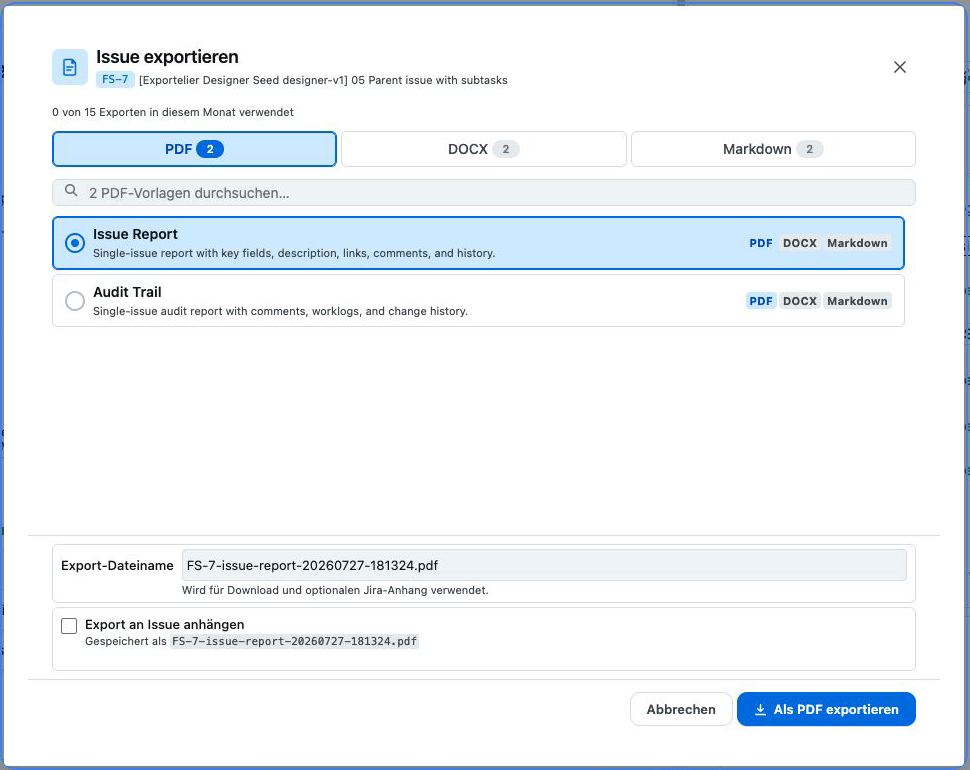 The issue view with the Exportelier action open and a template selected.
What gets included
Depending on the template, a single-issue export can include:
- All standard and custom fields (via the field-renderer registry, with a safe fallback for unknown types).
- Comments, including internal vs. public where applicable.
- Worklogs, with an optional Tempo mirror mode — see Tempo.
- Change history.
- Embedded images and attachments.
Tips
- Use a focused template for stakeholder-facing PDFs and a detailed one for audit copies.
- For many issues at once, use Bulk & JQL instead of exporting one by one.
Permissions
You can only export an issue you are allowed to browse. See Permissions & roles.