Component library
The designer gives you 23+ drag-and-drop components. You assemble a template by dropping components onto the canvas and binding them to Jira data. This page is a reference to the component groups.
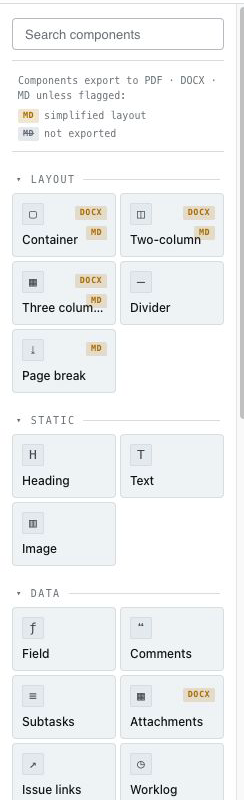 The designer's component palette with the component groups expanded.
Layout
Structural building blocks that arrange everything else: sections, columns, spacers, page headers and footers, and page breaks. See Layout & page setup.
Fields
Bind a component to any standard or custom Jira field — summary, status, assignee, dates, numbers, select lists, and more. Unknown field types fall back safely. See Binding components to Jira data.
Repeaters
Repeat a block of components once per issue (in bulk/board/sprint exports) or per item in a list, with optional grouping. See Repeaters & grouping.
Lists and tables
Ready-made components for issue content:
- Comment lists
- Worklog tables (with a Tempo mirror mode — see Tempo)
- Change history
- SLA & approval lists (useful for Jira Service Management)
Signature blocks
Drop a signature block for sign-off documents. Combine with digital signatures for tamper-evident PDFs.
Every component appears, pre-arranged, in the bundled templates. Duplicating a bundled template is the fastest way to learn what each component does — see Managing templates.